This article covers emails flagged as SPAM by the GINERNET relay. If your emails are flagged as SPAM by the recipient, check this other article instead: My emails arrive as SPAM.
At GINERNET we run a relay service on our shared hosting and on some managed VPS whose job is to perform an antispam check on outgoing emails.
This is especially useful when a customer's website has been hacked and the attacker uses it to send SPAM: this way we block those emails.
Occasionally, a legitimate email may be flagged as SPAM by mistake, which is known as a false positive. In this article we show you how to fix it.
How to read the bounce
When the relay flags an email as SPAM, you receive a bounce message telling you it was not delivered. Inside it you will find something like this:
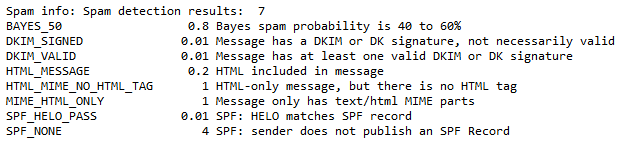
The report has 4 sections you should look at:
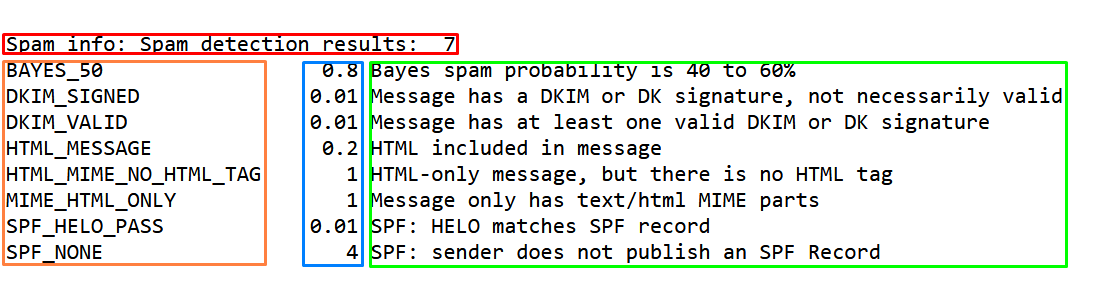
- In red: the total antispam score. Any value above 4 causes the email to be flagged as SPAM.
- In orange: the names of all the rules that matched.
- In blue: the individual score of each rule.
- In green: a short explanation. More detailed explanations are available here.
A real example
In the example image, 4 rules add up to a score of 7 (the maximum allowed is 4):
- BAYES_50. A Bayesian filter rule: it estimates a 50% chance the email is SPAM based on the subject and body. 50% is not much, so it only adds 0.8 points. Not a real fault; it barely affects the score.
- HTML_MIME_NO_HTML_TAG. The email was sent as HTML but without proper HTML tags. This is caused by the program used to send the email; we recommend updating it. Medium-level fault: worth fixing so recipients do not flag the email as SPAM.
- MIME_HTML_ONLY. The email was sent as HTML without a plain-text version (it should send
Content-Type: multipart/alternative;). Also caused by the sending program; we recommend updating it. Medium-level fault. - SPF_NONE. The sender's domain has no SPF record. SPF is added automatically when a hosting account is created and legitimises the sender; an email without SPF is very likely from a spammer. Critical fault: an email should never be sent like this, which is why it adds 4 points at once. Even if our relay had not blocked it, the recipient would probably have flagged it as SPAM and the server's reputation would have suffered.
Email content matters
- Do not write the subject ALL IN CAPITALS and use coherent sentences: antispam systems understand linguistic syntax better every day.
- If it is a reply or a forward, remove all content that is not relevant. Long reply chains often produce HTML errors that add antispam points.
- Avoid extremely long signatures. The typical legal disclaimer "This email is intended for its recipient..." is a myth and only causes trouble: if you need legal wording, link to your website instead (for example, to your GDPR clauses).
- Avoid "strange" font colours: many antispam systems treat them as an attempt to hide content.
- Images are best sent as attachments. If you embed them in HTML, keep the text-to-image ratio above 90% text.
- Send emails in plain text. If you use HTML, make sure you also include a "plain text" version and that the HTML is properly formatted. If you are having SPAM issues, send plain text only, at least at first, to debug the problem.
- Avoid shortened links (bit.ly, tinyurl.com, t.co, fb.me...). These URL shorteners are heavily used by hackers and spammers to hide the real URL of malware or phishing.
- Avoid contact forms on your website: it is better to publish your email address. When a user writes to you directly, your address enters their whitelist and your replies will be delivered correctly.
Conclusions
Thanks to our blocking rules, the antispam relay has an excellent reputation: practically 100% of the emails sent by our customers reach the recipients' inboxes.
Less than 0.3% of the emails sent by our customers are incorrectly flagged as SPAM, and for those cases the bounce message includes the information needed to fix the problem.